
Included with Advanced · Windows & Linux
Your game servers, running themselves
Omni Cluster looks after your dedicated game servers, on Windows or Linux. It starts your Unity or Unreal server build, restarts a server if it crashes, starts another when a game mode fills up, closes spare empty ones, and lists them all in your backend so players can find them.
- Any build, headlessUnity
-batchmode -nographics, Unreal-NullRHI, on GPU-less Windows or Linux VPS nodes. - No per-hour orchestration billA one-time licence and a VPS you rent by the month.
- Control it from your dashboardRestart, stop or start a private server from
/admin. - Tied to your backendSet up from a file that comes with your download.
Why not a cloud orchestrator?
Services like Amazon GameLift Servers, Edgegap and PlayFab Multiplayer Servers are built for studios that need servers in many regions at once and bill by the hour or minute. If you run a few servers on machines you rent or own, Omni Cluster does the day-to-day job for a one-time price.
🖥️ Run any build headlessly
Unity servers start with -batchmode -nographics and Unreal with -NullRHI, so they run on cheap Windows or Linux VPS nodes with no graphics card.
No separate dedicated-server target in your Unreal project? Your normal game build can run as a listen server, with UE4SS on the servers for console commands and mods.
Inside the server, the Unreal plugin in your download has game-server nodes (Redeem Join Ticket, Player Left, Start Heartbeat, Upload Match), and Unity servers use the C# game-server SDK. Omni Cluster gives each server its id; the server reports its player count, so Omni Cluster knows when to start another.
🔄 Self-healing, with leak-clearing restarts
A server that crashes is restarted straight away. Long-running servers are restarted on a schedule to clear the memory that game servers slowly build up, after giving the players on them time to finish.
When every server of a game mode is full, another one starts; spare empty ones close again.
💶 No per-hour cloud bill
You pay once for Advanced and rent a plain Windows or Linux VPS by the month (an EU node and a US node, say). There is no per-minute orchestration fee, and a busy weekend costs the same as a quiet one.
Your servers and data stay on machines you control, whatever happens to a hosting provider's plans.
🔑 15-minute setup with scoped keys
Import the .omnisetup file that comes with your backend download, add a server key, point it at your build, launch.
The key starts with ubgs1. and only has the fleet and matches scopes, so your admin password never goes near a game server machine. Revoke the key in the dashboard any time.
How it compares
A fair look at what you get and give up. The big services are the better choice if you need servers in many regions, started and stopped on demand.
| Omni Cluster (Advanced) | Amazon GameLift Servers | Edgegap | PlayFab Multiplayer Servers | |
|---|---|---|---|---|
| How you pay | One-time Advanced licence, plus your own VPS or PC | Per instance hour, e.g. $0.099 for a 2-vCPU Linux instance (US East, on-demand); Windows costs up to about twice Linux | $0.00115 per vCPU per minute (about $0.069 per vCPU-hour), plus $0.10 per GB sent | Per VM hour, e.g. $0.252 for a D2v2 (US East), plus data sent from $0.05 per GB |
| Where servers run | Machines you rent or own | AWS regions worldwide | Edgegap's locations worldwide | Azure regions worldwide |
| Adds machines by itself | No: adds servers on the machines you run it on, up to your limit | Yes | Yes | Yes |
| Crash restarts | Yes | Yes | Yes | Yes |
| Changes to your server build | None needed (one optional call to report player counts) | GameLift server SDK | Packaged as a container image | PlayFab game server SDK (GSDK) |
| Backend for players | Included: sign-in, server list, join tickets, matchmaking, rankings (Advanced) | Separate (FlexMatch and other AWS services) | Separate matchmaking product | Part of PlayFab |
| Voice chat between players | Included: a relay per server and a ready-made Unity voice chat | Not built in: add a separate voice service | None listed: add a separate voice service | PlayFab Party, billed per player-minute of talking |
| Operating system | Windows (app) or Linux (background service) | Linux or Windows | Linux containers | Linux or Windows |
| Best for | Indie and community games on a few regional servers, with a predictable monthly cost | Games that need many regions, large player peaks and on-demand capacity, and studios happy to pay per use for it | ||
Prices are the providers' published rates as listed on 12 November 2026 and change often; check their pages before deciding: GameLift Servers pricing, Edgegap pricing, PlayFab Multiplayer Servers billing, PlayFab Party meters. Unity's own Multiplay Game Server Hosting was deprecated on 1 April 2026. Amazon GameLift, Edgegap and PlayFab are trademarks of their owners; BackendGen.dev is not affiliated with them.
What it takes off your hands
The jobs you'd otherwise do by hand on a server at 2 a.m.
⚙️ Starts and watches
Every server
- Starts each server with its own port, map and mode
- Restarts a server that crashes, and restarts long-running ones on a schedule, giving players time to finish first
- A live log for every server, kept on disk too
📈 Grows and shrinks
Per game mode
- Always at least one server for every mode you host
- Another server when they are all full, up to a limit you set
- Closes a spare server once it has been empty for a while
🔗 Joined to your backend
Game servers (Advanced)
- Registers every server, so players get it from
/api/fleet/servers - Private servers with a password, hidden from the public list
- Can upload the match result files your game writes, for skill rating
🖥️ Dashboard control
From any browser
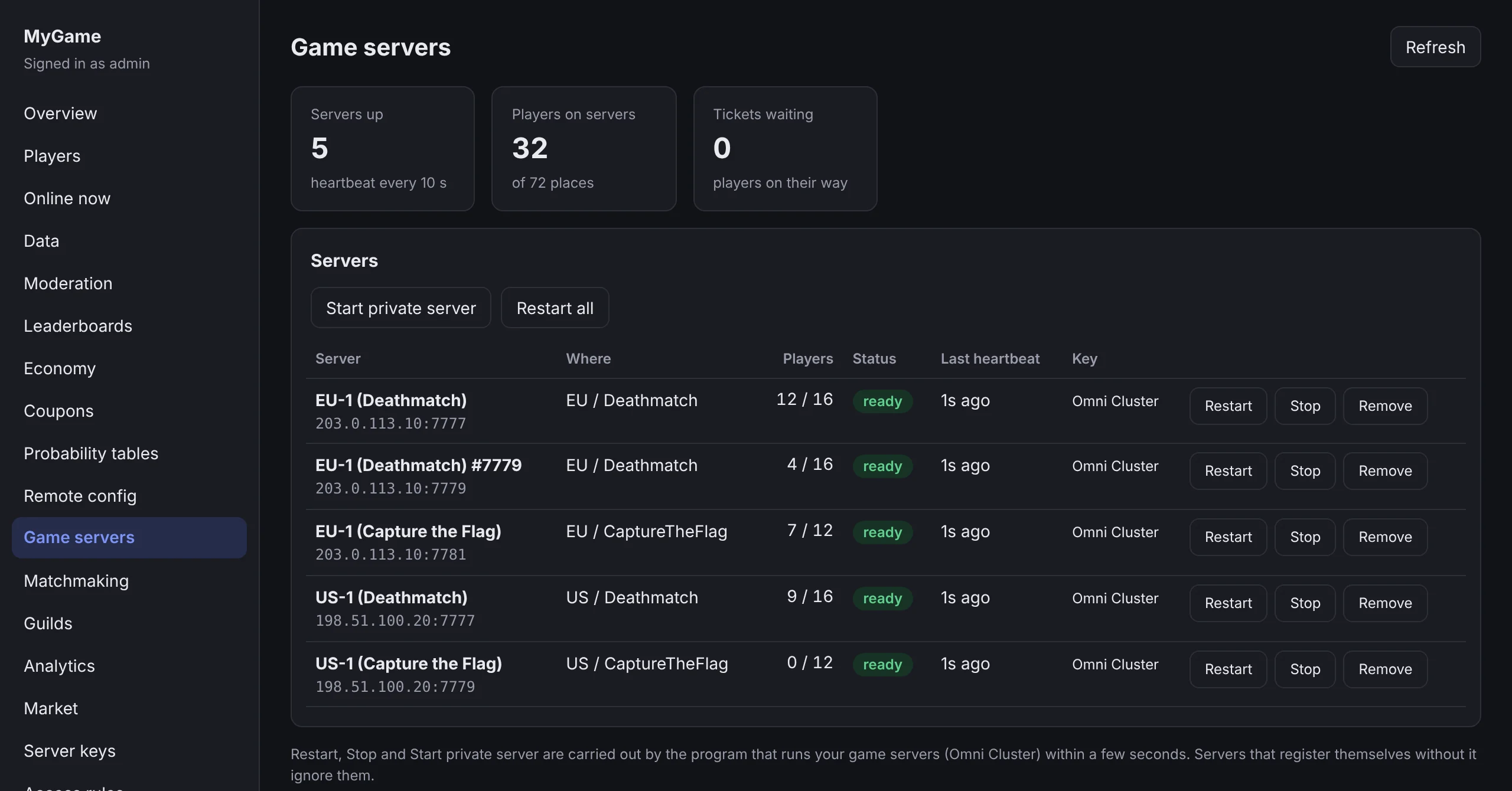
- See every server, its players and status on the Game servers page
- Restart, stop, restart all, or start a private server
- Install the dashboard as an app on your phone (on HTTPS)
🎮 Engine tools
Unreal and Unity
- Writes config files (such as Engine.ini) before each launch
- Unreal: console key remap, UE4SS and its mods on or off
- Unity: BepInEx on or off
🔌 Set and forget
On your own machine
- Opens the game and voice ports on your router (UPnP) if you want it to
- Starts with Windows (or as a Linux service) and launches the cluster by itself
- Passwords and keys are stored encrypted for your Windows user, or in a file only the Linux service can read
Voice chat, included
Players on the same server can talk to each other, with no voice service to sign up for and no per-minute bill.
- A voice relay next to every server. Tick one box in Omni Cluster and each game server gets its own voice channel.
- Ready-made Unity voice chat. It comes in the Omni Cluster download: add one component, type your key and connect when the player joins a server.
- Voice activated, push to talk or always on. Push to talk works with a key or a VR controller button. 3D voice and muting single players are built in.
- Windows, Mac, Linux, Android, Meta Quest and iOS builds. Not WebGL: browsers can't use UDP.
- Other engines can use the relay too. It speaks LiteNetLib, and the packet format is documented.
// when the player joins a game server
voice.playerName = gamertag;
voice.ConnectToGameServer(address, gamePort);

// when they leave the match
voice.Disconnect();
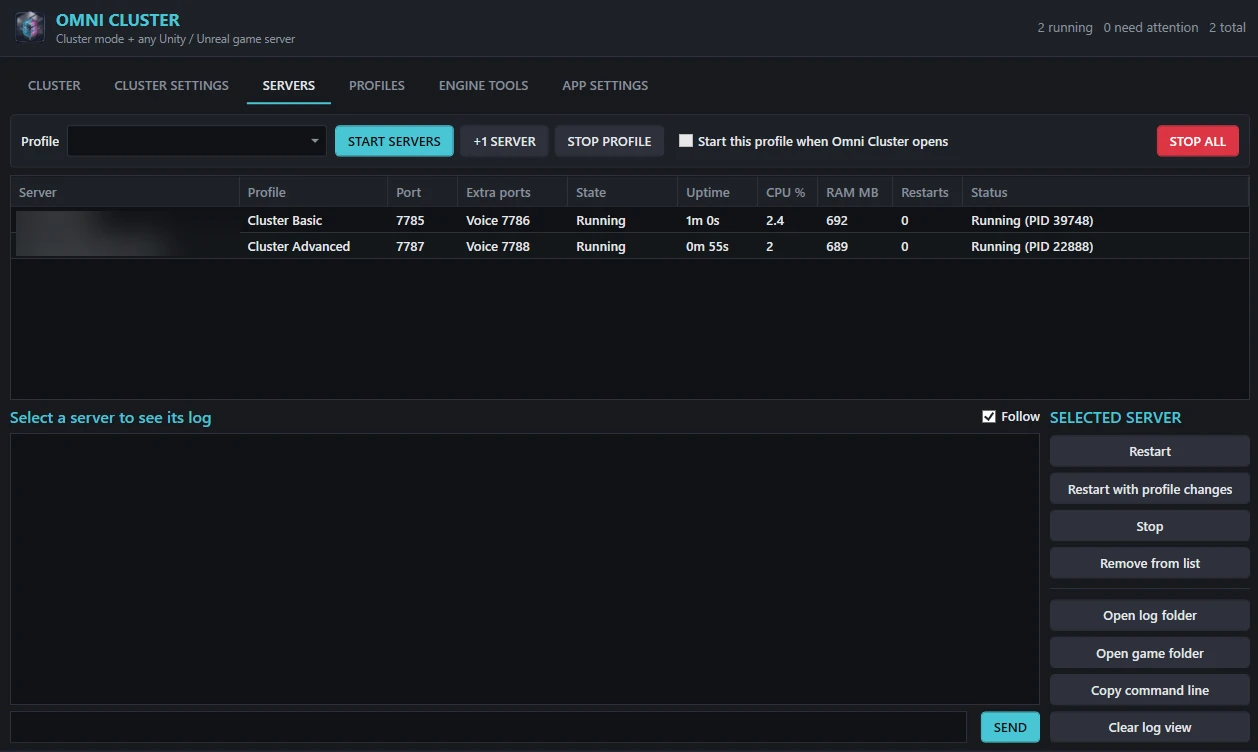
Two ways to keep an eye on it
On the machine itself, or from your backend's dashboard wherever you are.
Set up in about 15 minutes
Chapter 11 of the manual walks through every click.
- Download your backend
With Advanced, keep the Add-on's Game Servers switched on. The zip gets an
OmniClusterfolder with a setup file made for that backend. - Make a server key
In your backend's dashboard, under Server keys. Omni Cluster uses it instead of your admin password.
- Import and fill in
Download Omni Cluster from your account page, import the setup file, then tell it your backend's address, the key, and where your server build is.
- Launch
Press LAUNCH CLUSTER. Your servers appear on the CLUSTER tab and in your dashboard within seconds.
On a Linux server
The Linux edition runs the same cluster engine as the Windows app, as a background service. Linux VPS plans usually cost less than Windows ones, because there is no Windows licence in the price.
- Everything that matters for a fleet. Crash restarts, scheduled restarts, adding and closing servers, private servers, the voice relay and dashboard control.
- Starts by itself after a reboot. It has no window: you answer a few questions once, then use your dashboard.
- Nothing else to install. .NET is built in. Ubuntu, Debian and most other Linux servers with systemd, on x64 or ARM64.
- Your game's Linux server build. Unity: Linux Dedicated Server. Unreal: a LinuxServer build.
- Windows-only: UE4SS, UPnP and typing into a game window. Commands go to the server's console input instead.
# unpack the download on your server
tar -xzf OmniCluster-linux-x64.tar.gz
cd omni-cluster
sudo bash install.sh

# answer a few questions, then start it
sudo omni-cluster setup
sudo systemctl start omni-cluster
omni-cluster status
Yours, on your machines
Omni Cluster comes with the Advanced licence and works with the backends you download from your own account.
No extra cost
Included with Advanced: no subscription and no fee per server. Run several machines by giving each its own host name.
Nothing phones home
The licence is checked on your machine and against your own backend. Omni Cluster never contacts BackendGen.dev.
Works without cluster mode too
On Windows, the SERVERS and PROFILES tabs run any dedicated server build on their own, with crash restarts and logs, no backend needed.
Good to know
What you need
- Windows 10, Windows 11 or Windows Server (64-bit), or a Linux server with systemd (x64 or ARM64). Nothing else to install.
- A dedicated server build of your game that starts from a command line (on Linux, its Linux server build).
- A backend from BackendGen.dev with the Advanced Add-on's game servers.
- Game ports open to players: forwarded on your router, or allowed in your server's firewall.
What it isn't
- Not hosting: it runs on your own PCs or servers.
- Not netcode: your networking library still runs the gameplay.
- Not for macOS. On Linux there is no window: you use a few commands and your dashboard, and UE4SS, UPnP and typing into a game window are Windows-only.
- Not code-signed, so Windows shows "Windows protected your PC" the first time: choose More info, then Run anyway.
- Adding servers when one is full needs your game server to report its player count (one call with the included C# SDK). Without it, Omni Cluster keeps one server per mode running.
Questions
Do I need the Advanced licence?
Yes. Omni Cluster comes with Advanced (Base plus the Add-on). The download is on your account page, and every backend you download with the Add-on's game servers switched on includes its setup file. Already have Base? The Add-on upgrade adds it.
Does it work with Mirror, Fish-Net or Netcode for GameObjects?
Yes. Omni Cluster starts your server build with the command line you give it, for example -batchmode -nographics -port {port}; your networking library runs the gameplay as usual. Players find a server through your backend and connect to it directly.
Can I run servers on more than one machine?
Yes. Install Omni Cluster on each one, import the same setup file and give every machine its own host name. They all show up together in your dashboard.
Does it need BackendGen.dev to be online?
No. The licence is checked on your own machine and against your own backend. Omni Cluster only talks to your backend and to a public IP lookup service (to know the address players should connect to).
I bought on the Unity Asset Store. How do I get it?
Claim your free web licence on your account page. If it includes the Add-on, Omni Cluster appears there too.
Should I use this or GameLift / Edgegap / PlayFab?
If you run a handful of servers in one or two regions and want a predictable monthly bill, Omni Cluster on a rented Windows or Linux VPS is usually the simpler and cheaper route. If you need servers in many regions that start and stop with demand, a cloud orchestrator is the better fit: Omni Cluster doesn't rent machines for you. See How it compares.
Does it include voice chat?
Yes. Omni Cluster can run a voice relay next to every game server, and the download includes a ready-made Unity voice chat that connects to it: players on the same server hear each other. It works in Windows, Mac, Linux, Android, Meta Quest and iOS builds, but not WebGL. Other engines can use the relay through LiteNetLib; the setup guide (chapter 11) has the steps.
Can I run it on Linux?
Yes. The Linux edition runs as a background service on a Linux server (Ubuntu, Debian and most others, x64 or ARM64), with nothing else to install. You set it up by answering a few questions and control it from your backend's dashboard. It needs your game's Linux server build. See On a Linux server.
Let your servers look after themselves
Omni Cluster comes with Advanced, alongside matchmaking, the game-server fleet, the admin dashboard and the rest of the Add-on.